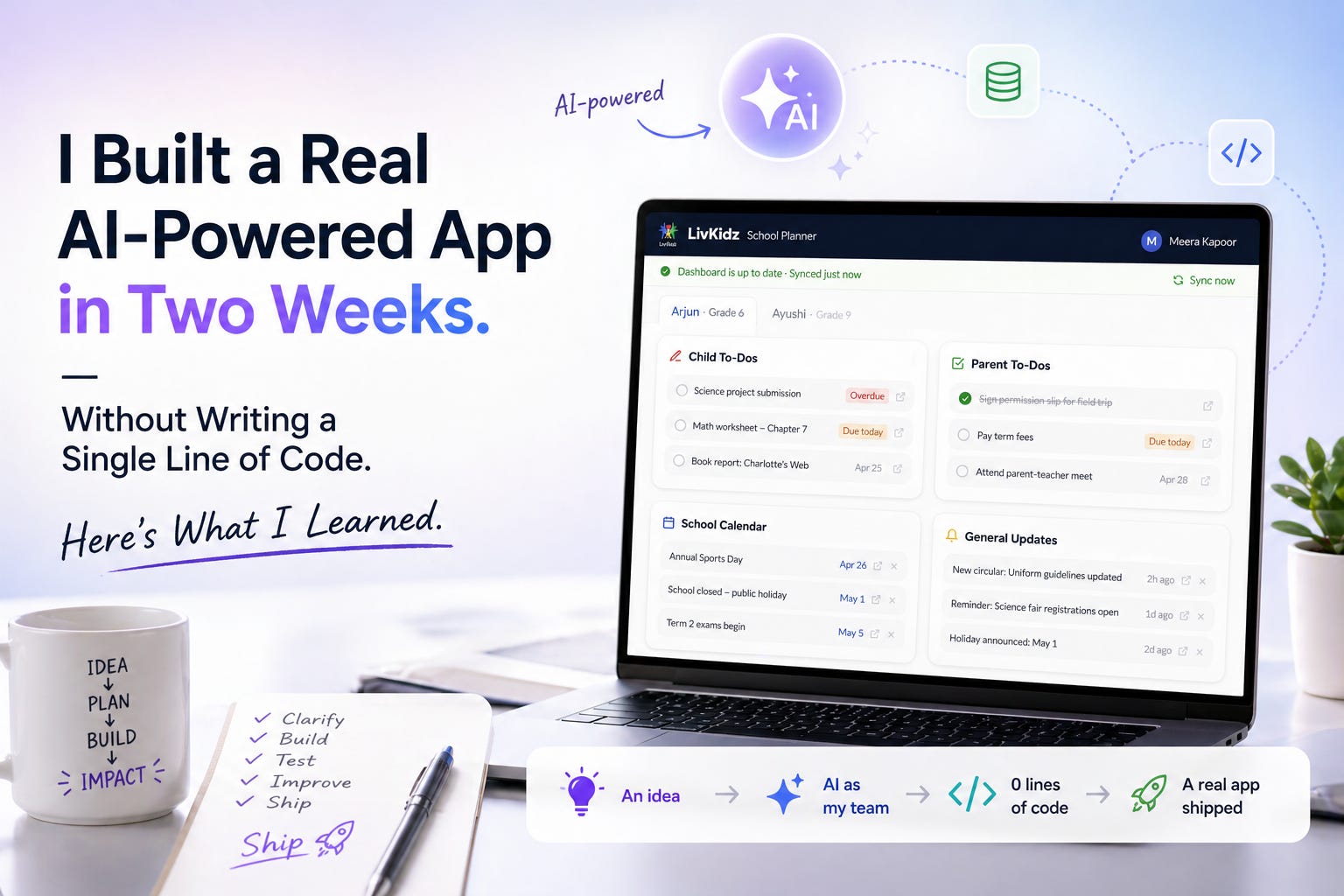
I shipped an AI-powered app. Using Claude Code. In under 2 weeks
A product leader's honest account of building and shipping a real app — without writing a single line of code, using Claude Code as my entire team.

The Problem
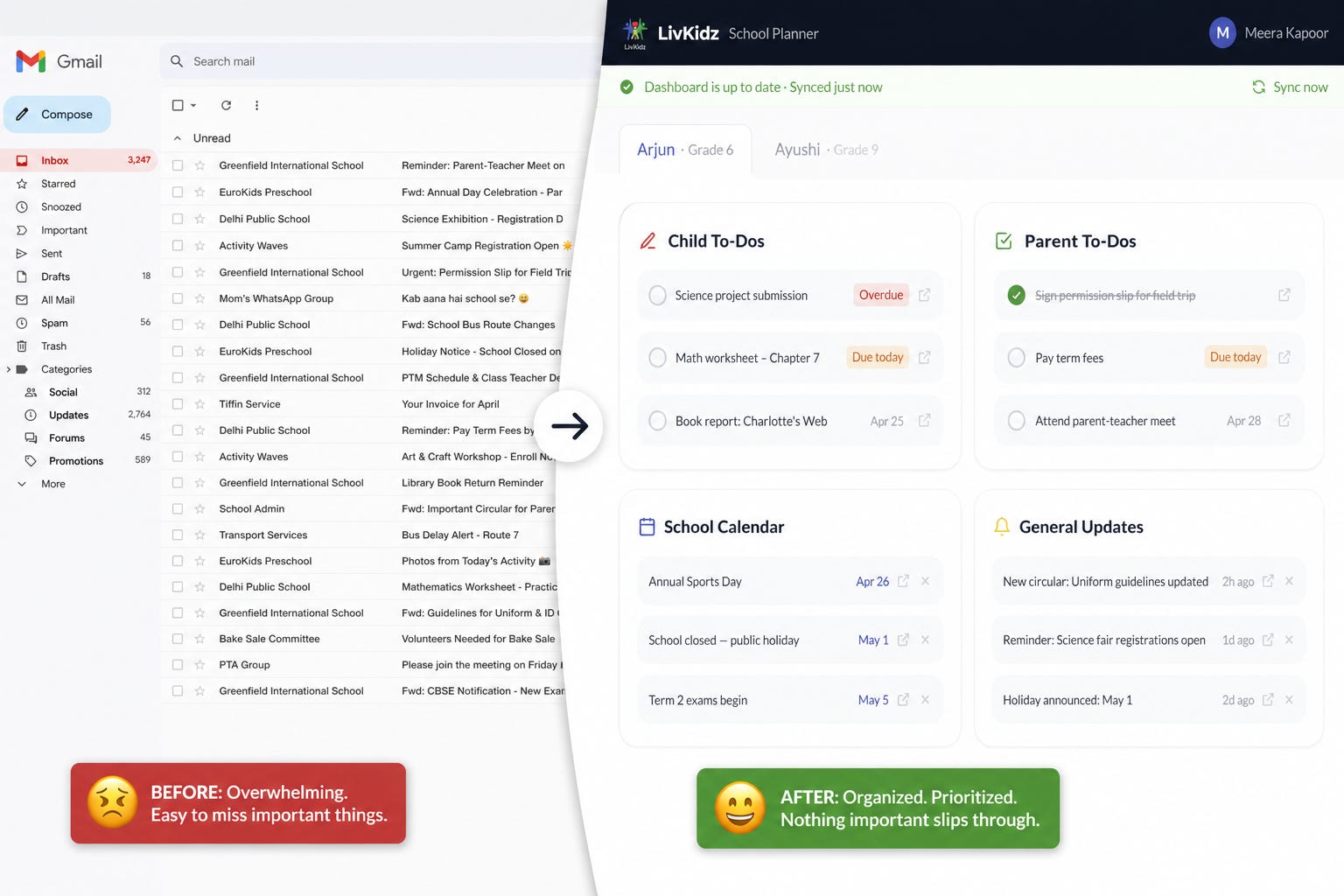
My wife and I are parents of two school-going kids. And like most parents, we were drowning in school emails and WhatsApp messages— homework reminders, event notifications, registrations to be done, teacher updates — all buried, all mixed in with work email, all easy to miss. This led to lots of missed school deadlines and lots of heartburn!

As a product leader with 25+ years of experience and as a founder of a company (LivKidz), whose main aim is to simplify the lives of working parents, I knew that I had to build a solution to solve this pain point which was so real, for so many parents.
What I Built: LivKidz School Planner
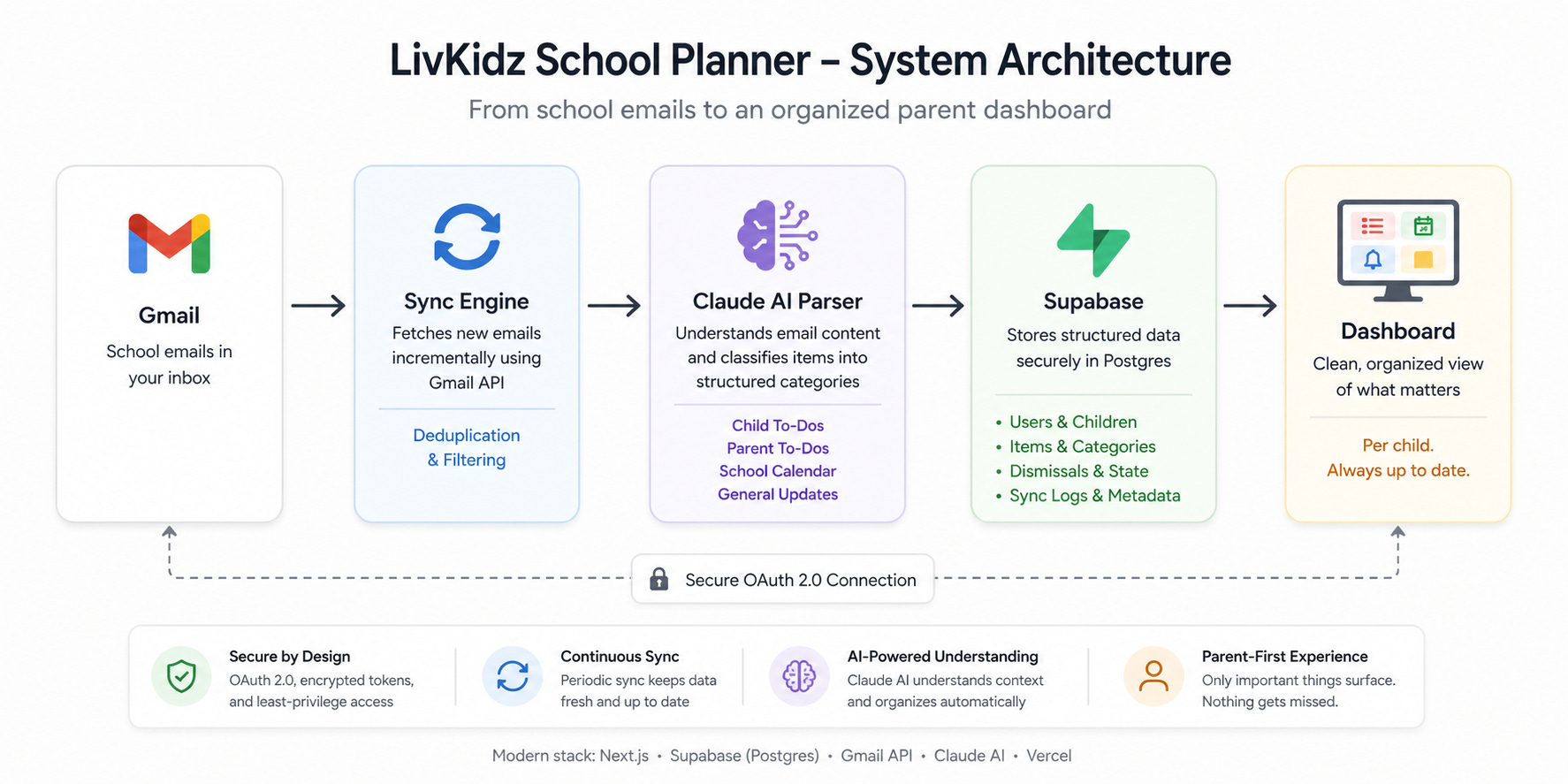
LivKidz School Planner is a parent dashboard that connects to your Gmail, reads your school emails, and automatically organizes them into four categories — Child To-Dos, Parent To-Dos, School Calendar, and General Updates — per child. No manual tagging. No copy-pasting. Sign in with Google, tell the app which senders are your school’s, and it does the rest.
How did i build this?
To build this, I used Claude Code — Anthropic’s AI coding agent — as my entire engineering function. Two weeks. Roughly two hours a day. A production-grade app with authentication, a database, third-party API integrations, and AI at its core.
Tech stack: Next.js, Supabase, Gmail API, Google OAuth, Claude AI, Vercel
Overall, I was very pleased with the result. Spending few hours every day, late night after work, building with Claude Code - it really took me back to my engineering roots and I really enjoyed the process of building on my own :-)
Here are my learnings from the experience.
Learnings from Building “LivKidz School Planner” with AI
1. Claude Code > Code
Claude Code is not just your Developer. It’s Your Entire Team. Going in, I thought of Claude Code as a coding assistant. I was wrong.
Over two weeks, it played every role on the team and I encourage anyone using it, to leverage it that way too.
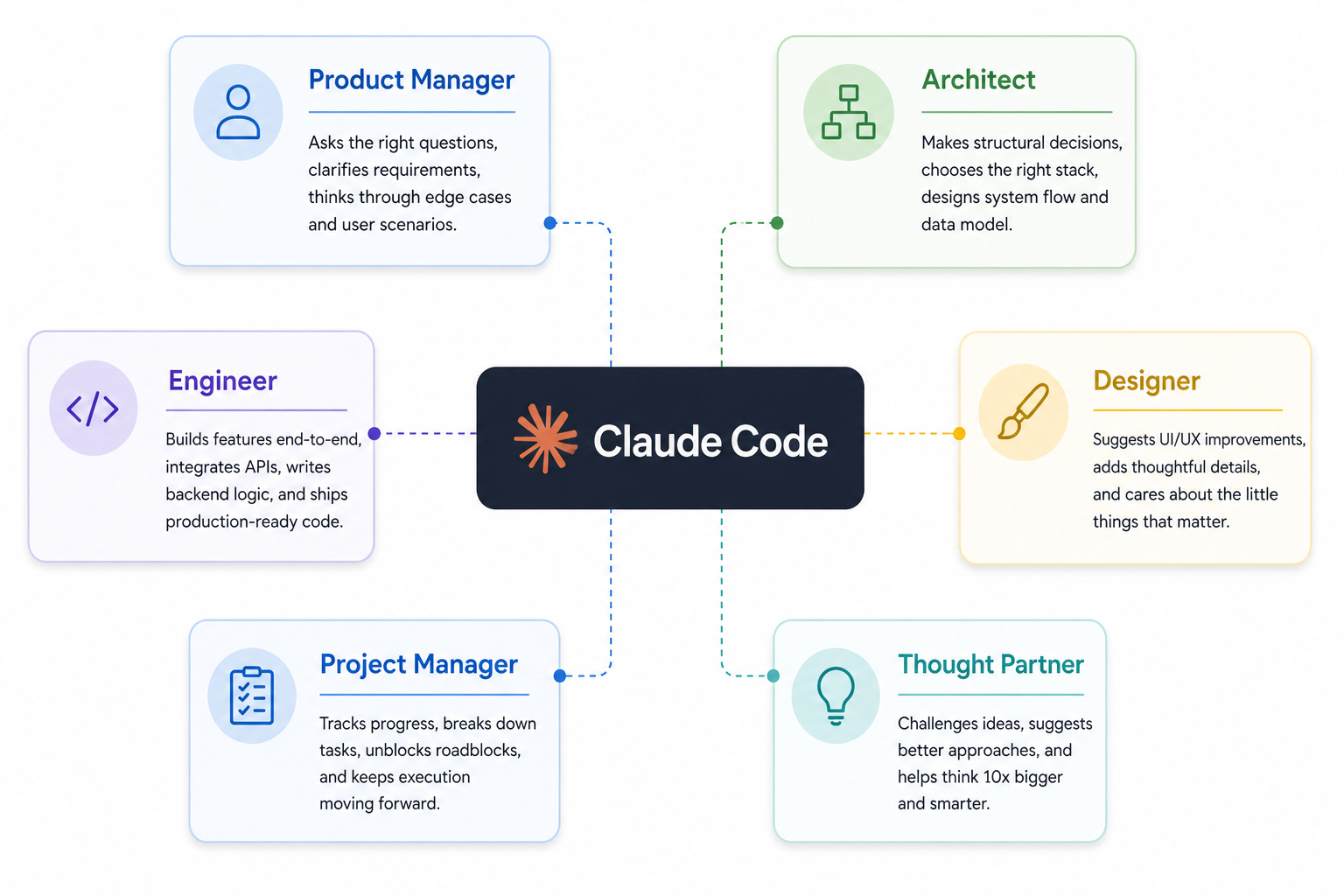
Product Manager: When I described the dashboard feature, Claude Code asked clarifying questions that I hadn’t thought through — should marking an item done for Child A affect Child B? What if the same school email is relevant to both kids? These are PM questions. It was working as a PM in my team and helping me refine and drive clarity on the requirements.
Architect: It made all the big structural decisions. It recommended the right stack — Next.js (full-stack React, no separate backend needed), Supabase (for database), NextAuth (OAuth out of the box), Vercel (one-click deployment). When I pushed it to improve latency, it consolidated three separate API calls into a single parallel endpoint for better performance.
Engineer: It built everything — Gmail API integration, OAuth flow, email sync engine, Claude AI parsing pipeline, email dedupe logic. And it handled all project setup: installing dependencies, configuring libraries, setting up the database schema, connecting third-party services. End-to-end.
Designer: It came up with a simple, modern UX for the dashboard including onboarding, dashboard setup and the final dashboard of course. It proposed things I never asked for — a user avatar with initials in the top-right corner, a loading bar across the top during data fetches, a “Gmail disconnected” reconnect banner for when OAuth tokens expire, fade-out animations when items are dismissed. It knows what good product design looks like.
Project Manager: It helped me track overall progress throughout the build — what had been built, what was pending, what needed testing. I didn’t need a separate tracker. Claude Code was it.
Thought Partner: When I described features loosely, it pushed back and asked for more clarification When I was going in circles on a logic problem, it reframed it.
I had no developer, no designer, no architect, no tech agency. I had Claude Code — and I was able to ship a product just using Claude Code.
Stop thinking of Claude Code as merely a developer. Think of it as your entire team.
2. You Still Need to Own the Product. That Part Doesn’t Change.
Here’s the flip side of Learning #1.
Claude Code is a brilliant team member. It is not the product manager. That’s you. And if you forget that, you’ll feel it.
Early in the build, I described the dashboard loosely — something like “show school items organized by type.” Claude Code made a reasonable assumption: a single list, sorted by category. Functional. Logical. Wrong. What I actually envisioned separate cards — one per category — with items organized per child. That’s a fundamentally different UX. The assumption wasn’t unreasonable. I just hadn’t been specific enough.
Some of the product decisions made while building LivKidz School Planner came from me, as the builder and not Claude Code.
Four separate cards (Child To-Dos, Parent To-Dos, School Calendar, General Updates) — not one list. And what goes where
Onboarding process and steps involved. Supporting multiple children, different schools, how to define email senders and guiding parents in this process, are other examples of decisions taken
Landing page structure and key message to highlight. Separating “Request an Invite” from “Already Invited? Sign In” on the landing page — two different user states, two different CTAs
Lookback window, auto refresh or not and many other decisions where I took the call as the PM.
Claude Code executed all of these brilliantly once I defined them. It could not have made these calls on its own. I had to.
AI lowers the cost of building to near zero, but it does not lower the cost of not knowing what to build. You should own that part.
3. Let AI Handle the Engineering Complexity — That’s Its Superpower
Although I am an engineer by background, but I haven’t coded in a while.
I didn’t know many technical details (e.g. how OAuth token refresh works).
It didn’t matter. Claude Code handled all of it — and the depth genuinely surprised me. Some specific examples:
Email deduplication: An
email_logtable tracks processed Gmail message IDs — already-parsed emails are skipped on every subsequent sync. I didn’t ask for this. It just built it the right way.Per-child state isolation: The
item_dismissalstable uses user ID + item ID + child ID as a three-part unique key — so marking done for Child A never affects Child B.API performance: Three separate database calls on dashboard load, consolidated into one parallel endpoint. Faster, cleaner.
None of these were in my requirements. Claude Code brought them proactively (for the most part). That’s what I mean by letting it handle the engineering complexity.
4. Is MVP Still Relevant in the Age of AI? Short Answer: YES
When building is fast and cheap, the temptation is to build everything. I caught myself doing exactly this.
Midway through the build, the core product was working — sync, dashboard, per-child state, the full flow.
And, then I started to add more features (e.g. notifications, shared view between parents, ..and more)
Why? Because I could, and no one was pushing back !
None of these were bad ideas. But, they were resulting in scope creep for the MVP and it would have resulted in a feature-rich, bloated product which the user may have found too complex to use. I made a deliberate decision to stop.
LivKidz School Planner does one thing: reads school emails and organizes them per child. Everything else belongs to a future version, post MVP validation with real users.
MVP isn’t about what you can build. It’s about what you should build first. That judgment becomes more valuable, not less, when building gets cheaper.
5. AI Makes Mistakes. Stay in the Loop to catch them.
AI is powerful, but it is not perfect. Here’s what I ran into - some examples.
Getting the four cards right took many iterations. Deciding what belongs in each category sounds simple. It isn’t. In one case, a homework reminder email was appearing in both Child To-Dos and School Calendar — two cards simultaneously. The root cause: the AI was producing multiple items from a single email at different priority levels.
The fix required building an explicit priority-based classification system, a decision tree e.g. deadline beats to-do beats event beats update, a hard rule that a single email can only produce one item at its highest applicable priority. It took several rounds of testing outputs, identifying wrong classifications, and refining the parsing prompt before it was consistently correct.
Context window truncation. Claude has a context window limit. When school emails were long — full newsletters, multi-section updates — the parsing would silently truncate content. Due dates buried at the bottom of a long email weren’t being extracted, because that text never made it into the prompt. It took multiple rounds of “why isn’t this showing up?” before we diagnosed it. I had to be involved and push Claude Code, to uncover this flaw in the design.
Email formats Some school systems like Veracross use a different email structure, which resulted in those items not appearing on the dashboard. I caught it during my testing, AI didn’t flag it. It required extensive debugging to figure out the root cause - that the parsing logic was built around a standard email format and simply didn’t handle Veracross’ structure. Once diagnosed, the fix was straightforward. But getting there wasn’t.
Claude Code does have limitations (some examples - my wishlist for Anthropic)
No image generation. I wanted custom illustrations for the landing page. Claude Code can’t generate images. I had to use other AI toolsfor this (Side note: the new chatGPT image generation is super awesome! give it a try!)
No screen sharing or pasting screenshots. During setup — finding an API key, locating a project URL, navigating a third-party settings panel — I had to describe in words what I was seeing on my screen for Claude to guide me. Being able to paste a screenshot, or share your screen with Claude, would dramatically reduce this kind of overhead.
Review AI output like you would any other feature! Stay in the loop. Dive Deep
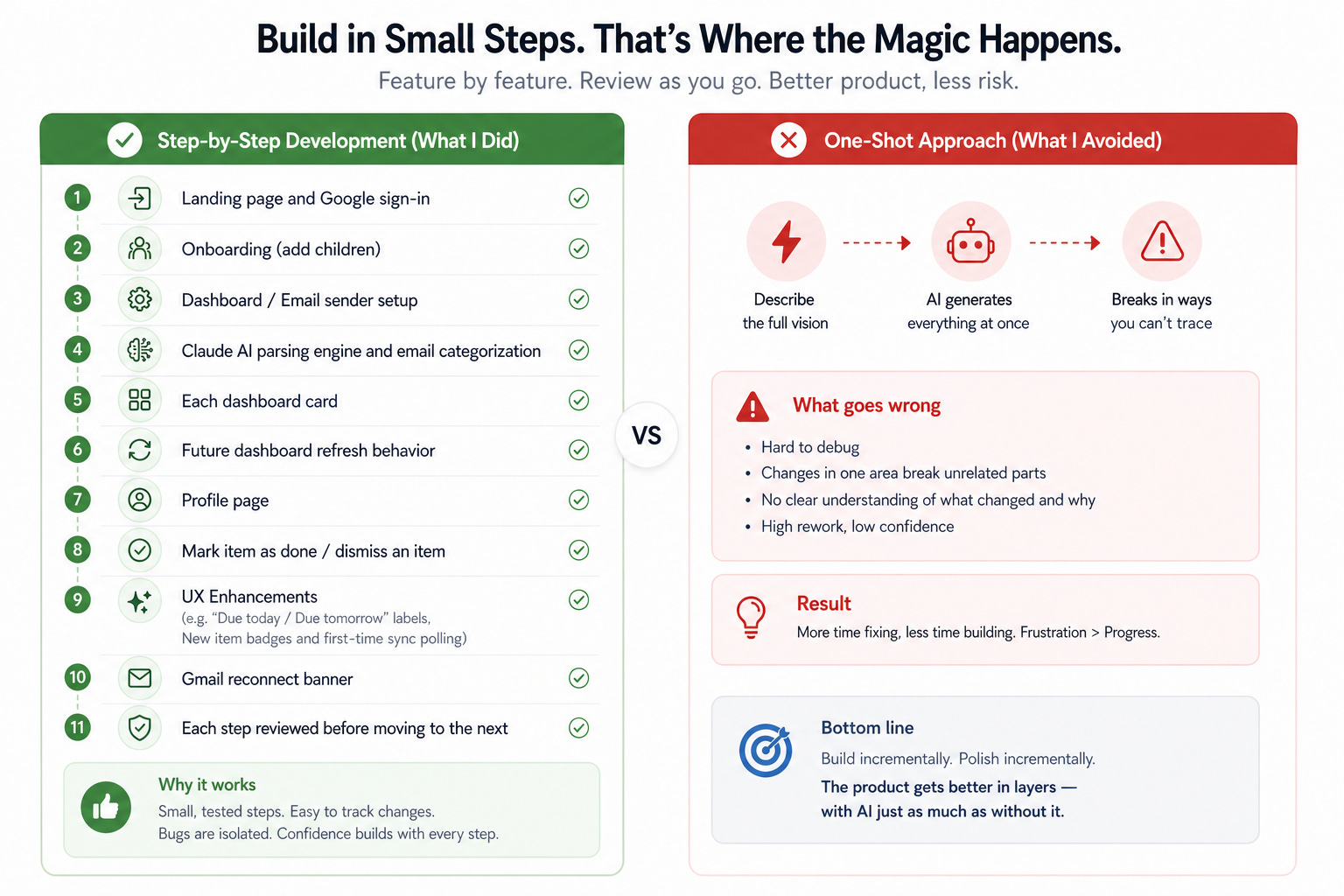
6. Build in Small Steps. That’s Where the Magic Happens.
I’ve seen what happens with one-shot prompting. You describe the full vision, the AI generates something that looks right, and then it breaks in ways you can’t trace — because nothing was built incrementally.
With LivKidz School Planner, I built it feature by feature and it worked quite well.
Landing page and Google sign-in
Onboarding (Children details)
Dashboard / Email sender setup
Claude AI parsing engine and email categorization
Dashboard UI Including 4 cards
Dashboard Refresh
Profile page
Avoid Clutter - Mark item as done / dismiss an item
UX Enhancements (e.g. “Overdue / Due today / Due tomorrow” labels, New item badges and first-time sync polling)
Gmail reconnect banner (e.g. if the user changes their Gmail password)
Each step was reviewed before the next started. When something broke, the blast radius was small — I always knew exactly what had changed.
Build incrementally. Polish incrementally. The product gets better in layers — with AI just as much as without it.
7. Always Ask AI for a Plain English Explanation
Every time Claude Code proposed a significant change, I asked it to explain what it was doing in plain English — as if briefing a non-technical product manager.
This resulted in two benefits over time.
a) First, I stayed genuinely in the loop — I knew why each change existed and what it might affect elsewhere.
b) Second, it caught misalignments before they became bugs.
Example: When Claude Code explained the email parsing logic, I realized categorization wasn’t working as I’d intended. I fixed it afterwards.
There were moments where the explanation itself was the debugging — something felt off, I’d ask, and the act of articulating what had been built would surface the flaw.
Don’t treat AI outputs as a black box. Treat them as proposals to be reviewed and approved by you
8. It Felt Like Having a Reliable Partner — Not Just a Tool
This one is harder to quantify, but it might be the most important thing I want to leave you with.
Throughout the build, I never felt alone. When bugs appeared — and they did — I wasn’t staring at a stack trace with no idea where to start. Claude Code diagnosed, proposed a fix, and explained the reasoning. When a deployment failed, it walked me through it.
What this gave me was a sense of control throughout. With so much code written, I couldn’t go in and debug it myself. But, I always had the confidence that Claude Code would be able to troubleshoot it, and the technical side of things were taken care. It gave me the belief that I will be able to ship the product eventually and this kept me going.
It also brought back something I hadn’t felt in a while: the genuine joy of building. As someone who started in engineering before moving into product management, this process reconnected me with why I got into tech in the first place. Seeing something go from a rough idea to a LIVE product being used by real parents — that feeling doesn’t get old.
If you’ve been sitting on an idea, but waiting for the right team: now is the time to build
**Brief Update - Post Launch**
9. Shipping is where building actually begins
Few observations below post the launch
A few days after launch, I opened my own dashboard. It said “Synced just now” — the green banner, everything looking healthy.
But something felt off. Emails from the last few days weren’t showing up.
I dug deeper.
The sync was running on every page load, completing, showing success — but nothing was actually being fetched. Turns out, Google OAuth tokens issued during testing expire silently every 7 days and mine had expired.
I reconnected Gmail to fix it — but the reconnection itself silently failed, issuing a token without the right read permissions.
Also, it required 2 reconnects to get the dashboard to work again. Root Cause: When a Gmail token expired, clicking “Reconnect Gmail” appeared to work — but the dashboard asked to reconnect again. A two-step database operation where the second call silently did nothing if the first returned no data.
Two layers of quiet failure, zero indication anything was wrong
The fix: make failures loud. The app now immediately shows a “Reconnect Gmail” prompt the moment auth breaks, and collapsing two dependent database calls into one atomic operation
Few days after, a beta user reported their dashboard was hanging and showing nothing. Same app — but a completely different experience. Root cause: Their first sync had to process weeks of emails and was silently timing out before finishing.
The fix: the first-time sync window was tightened to stay within platform limits.
The third issue was caught from my daughter’s iPad. She uses the planner in Chrome signed in with my Gmail, but her Gmail app is signed into her own account. Clicking the email preview opened her inbox, not mine. The school email was invisible to her.
The fix — instead of linking out to Gmail, I built the email preview inside the planner, fetching content directly using stored credentials. Whatever Gmail app is on the device became irrelevant.
I fixed the issues. But the real lesson was harder: the app had no way to surface its own failures. It looked healthy while being completely broken. Build in a way that lets you see when things break — not just when they work.
Monitoring shouldn’t be an afterthought, it should be a priority
Final Thoughts
Building LivKidz School Planner was one of the most satisfying things I’ve done in a long time. Modern AI makes it genuinely possible for a non-coder to go from idea to production-grade product in weeks — but only if you bring the domain expertise, own the requirements, dive deep enough, and stay engaged throughout.
If you’re a PM, product leader, or founder sitting on a problem you’ve always wanted to solve — start. The barrier is lower than you think.
Anyways, these are my learnings. Your experience may vary — would love to hear yours in the comments!
Parents: Try it Yourself!
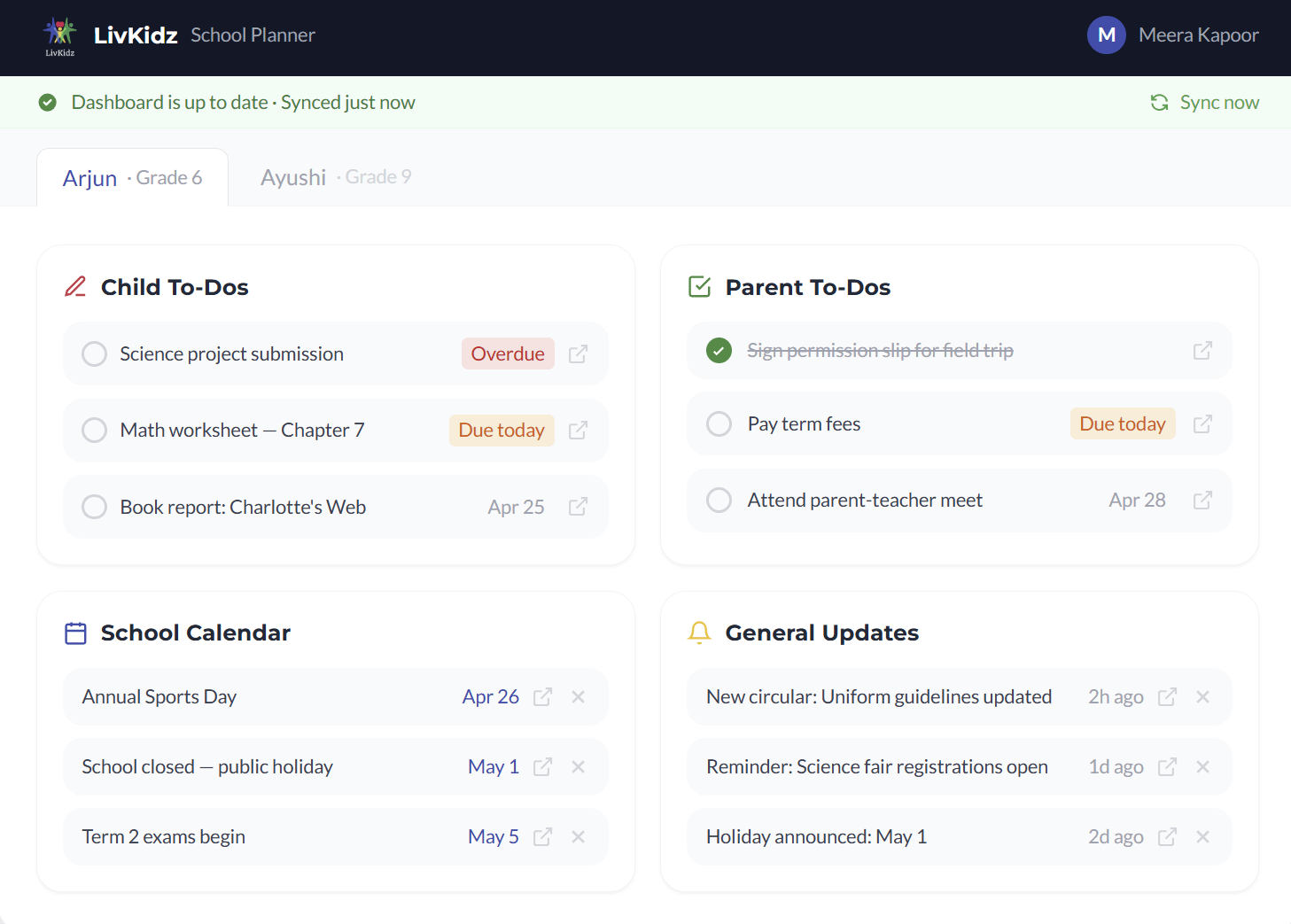
If you’re a parent exhausted by school email overload, here is how the planner works
Connects to your Gmail securely — read-only, no email content stored on our servers
You tell it which senders are your school or teacher
It automatically extracts what matters: deadlines, to-dos, events, and updates — organized per child
Done items can be marked off or dismissed — separately for each child
LivKidz School Planner is currently in beta. If you’d like access, you can request an invite by going to : planner.livkidz.com
P.S. This post is the 4th post in the series “How I AI with LivKidz”. Through this series, my goal is to share my practical, hands-on learnings in building with AI as part of my own venture. Follow me on LinkedIn, if you would like to be updated about future posts.
Updated with Point #9, with some "tough" learnings post launch. Check it out!